Executive Summary
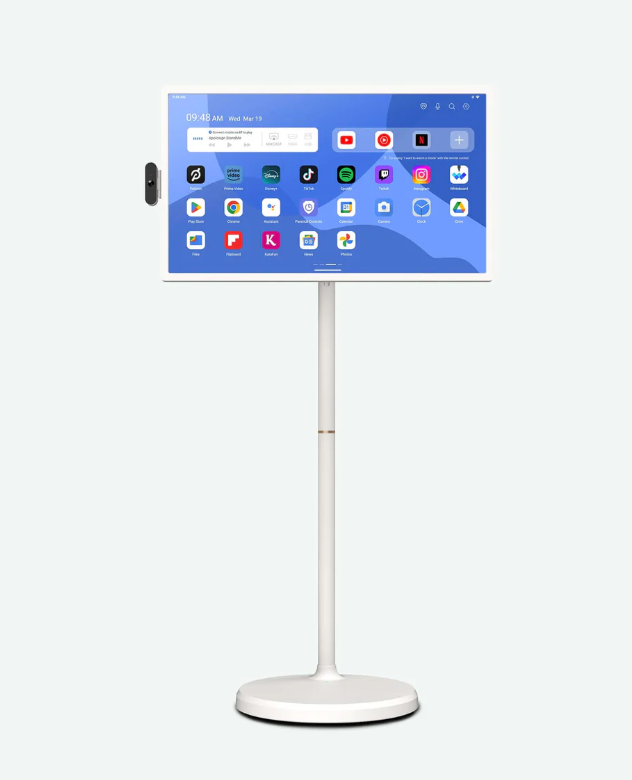
Buy the Apolosign 32-inch portable smart screen if you need a large, battery-powered, wheeled touchscreen for presentations, signage, education, patient check-in, trade-show demos, video calls, or shared-room media. Skip it if you mainly want a home TV, gaming display, travel monitor, or outdoor screen.
The clearest description is a giant Android tablet on wheels.
The buyer question is whether the all-in-one convenience justifies paying around the price of a good 55-inch television for a much smaller 32-inch panel. When the wheels, battery, webcam, touch input, Android apps, and 4K screen all matter to your workflow, the package makes sense. When only one or two features matter, a normal TV, tablet, or projector is usually better value.
Apolosign 32-Inch Portable Smart Screen at a Glance
| Buyer question | Quick answer |
|---|---|
| What is it? | A 32-inch battery-powered Android touchscreen on a rolling stand. |
| Is it a TV? | It can stream TV and video apps, but it behaves more like a large movable tablet. |
| Best for | Presentations, classrooms, video calls, demonstrations, signage, workouts, and shared rooms. |
| Reviewed model | 32-inch 4K touchscreen with Android, webcam, speakers, battery base, and wheels. |
| Main benefits | Touch input, battery operation, webcam, built-in apps, and room-to-room mobility. |
| Main drawbacks | High price, modest brightness, heavy base, assembly, and poor portability on stairs. |
BEST FOR
This is best for buyers who need a portable smart screen that moves around a building without becoming a full AV project every time.
- + Presentations where a laptop, TV cart, and webcam feel clumsy
- + Trade-show booths, pop-up displays, or product demos
- + Classrooms, training rooms, clinics, churches, and shared workspaces
- + Homes that want a movable kitchen, garage, workout-room, or bedside screen
Skip If
This is a very specific product. The wrong buyer will feel like they paid too much for a small TV with a stand.
- You want the biggest or brightest entertainment screen for the money.
- You need something light enough to pack, carry, and reassemble frequently.
- You expect high-end gaming or workstation performance from the Android hardware.
- You need a screen that looks great outdoors or in harsh sunlight.
- Your building has stairs, thick thresholds, or rough flooring between rooms.
Price Reality Check
The Apolosign 32-inch 4K model sits in an unusual premium niche, with reported pricing around $819 and cheaper 1080p versions available below it.
At this price, the wheels, battery, touchscreen, and webcam all need to matter.
A normal 32-inch smart TV is much cheaper. A portable monitor is easier to carry. A projector can create a larger image. The Apolosign becomes convincing only when you value the complete bundle and want it ready to move without reconnecting a laptop and accessories.
Is the Apolosign a TV or a Portable Smart Screen?
Apolosign uses terms such as portable smart TV and smart portable screen. In practical use, it is best understood as a large Android touchscreen mounted on a battery-powered rolling stand.
It can stream television, movies, YouTube, and other media apps, so calling it an Apolosign TV is reasonable. But its strongest uses are presentations, video calls, digital signage, education, demonstrations, dashboards, and room-to-room media—jobs where touch input and mobility matter more than traditional television features.
Buyer takeaway: Shop it as a movable interactive display, not as a conventional 32-inch television.
Deep Dive
The Screen-on-Wheels Idea
The feature that matters is not just the 32-inch display. The screen, battery, stand, webcam, speakers, Android apps, and touch input are already integrated.
That turns a screen into a movable station.
- Touchscreen: Useful for kiosks, menus, whiteboarding, demos, and Android apps.
- Battery base: Lets you move between rooms without shutting everything down.
- Webcam: Makes it useful for mobile video calls, hybrid meetings, telehealth, and classrooms.
Buyer takeaway: The product is most persuasive when it replaces several separate pieces of AV equipment.
The 4K Display Tradeoff
A 32-inch 4K touchscreen sounds excellent on paper, but resolution is only part of image quality. Professional testing has described the panel as useful overall while flagging modest brightness and uneven luminance.
- Sharp enough for indoor presentations, dashboards, signage, and app-driven demos.
- Not the best choice for cinematic home theater use.
- Not ideal for bright outdoor areas or color-critical creative work.
Buyer takeaway: Buy it for mobility and utility, not because it beats a dedicated television or monitor at pure image quality.
Android Hardware and App Flexibility
The built-in Android system makes the Apolosign portable smart screen feel more like a giant tablet than a passive display. That is useful for streaming, conferencing, signage apps, browser dashboards, slides, training content, and simple touch applications.
The catch: this is not a performance tablet.
- Use it for media, signage, lightweight apps, dashboards, and meetings.
- Do not expect serious Android gaming or workstation-class speed.
- Confirm compatibility before buying when one particular business app is essential.
Apolosign 32-Inch 4K vs. 1080p Models
The 4K model is most useful when viewers stand close, read small text, interact with detailed dashboards, or use the screen for presentations and signage. At normal television distances, the practical improvement over 1080p may be less dramatic than the price difference suggests.
| Decision point | 4K model | 1080p model |
|---|---|---|
| Small text and dashboards | Sharper at close range | Adequate for simpler content |
| Streaming video | More detail when 4K content is available | Usually sufficient at a distance |
| Price | Higher | Better value |
| Best buyer | Business, education, signage, and close interactive use | Casual media and simple room-to-room viewing |
Buyer takeaway: Pay for 4K when close-up text and detailed visual content matter. Choose 1080p when mobility and price matter more than resolution.
Apolosign vs. a Regular TV on a Rolling Cart
A normal TV on a cart usually delivers a larger screen for less money. The Apolosign wins when battery power, touchscreen control, built-in Android apps, webcam integration, and a cleaner all-in-one setup are genuinely useful.
| Priority | Better choice |
|---|---|
| Largest screen for the money | Regular TV and rolling cart |
| Battery-powered movement | Apolosign |
| Touch interaction and built-in apps | Apolosign |
| Home theater image and brightness | Regular TV |
| Fast room-to-room meetings or demos | Apolosign |
Real-World Ownership Check
The ownership story is mostly about physical reality. This is a large object with a heavy battery base. That helps stability, but it is not casual to carry.
- Setup: Expect assembly involving the base, support column, and VESA-style screen mounting.
- Battery: Keep it charged and confirm that expected runtime fits your workday.
- Fit: It makes the most sense on one floor with smooth surfaces and dedicated storage space.
- Apps: Test critical apps early while the return window is open.
- Deal breaker: Stairs, frequent travel, outdoor sunlight, and repeated packing make other displays more practical.
Frequently Asked Questions
Is Apolosign the same as Apollo Sign?
Yes. Apolosign is the correct brand spelling. “Apollo Sign,” including searches such as “Apollo Sign 32 inch,” is a common search variation or misspelling referring to the same product brand.
Can the Apolosign 32-inch screen work as a regular TV?
Yes, it can stream video through Android apps and serve as a movable television. It is less compelling than a standard TV when screen size, brightness, HDMI simplicity, or home-theater value matter most.
Is the Apolosign portable smart screen easy to carry?
It is portable in the sense that it rolls between rooms. The large screen and heavy battery base make it much less convenient to lift, carry upstairs, load into a car, or travel with frequently.
Is the 4K Apolosign worth more than the 1080p version?
The upgrade is easiest to justify for close viewing, small text, interactive dashboards, presentations, and detailed signage. For casual streaming from across a room, the cheaper 1080p model may be the better value.
What I Would Compare Next
Do not compare this only against televisions. Compare it against the job you need it to do.
- A normal 43-inch or 55-inch TV on a rolling cart: Better for a larger image at lower cost.
- A compact projector: Better for travel and large temporary images.
- An iPad or Android tablet with a stand: Better for portability, speed, and handheld use.
- Commercial digital signage: Better for always-on installations and centralized management.
Buyer Signal Analysis
The Apolosign 32-inch portable smart screen deserves a closer look because shoppers use several names for the same category: Apolosign TV, portable smart screen, rolling tablet, mobile display, teaching screen, and conference monitor. The buyer decision becomes easier once the product is evaluated as a workflow tool rather than an ordinary television.
Questions to Answer Before Buying
QuietTrends read: This is a compare-first product with unusually clear use cases. It is genuinely useful for mobile presentations, education, signage, demonstrations, and shared spaces—but easy to overbuy when a normal television would be enough.
OUR VERDICT
COMPARE FIRST
Apolosign 32-Inch Portable Smart Screen
This is a clever niche product that can be genuinely useful, but only when mobility, battery operation, touch input, webcam use, and Android apps are central to the job.
Final Buyer Guidance: Buy it for mobile presentations, education, signage, demos, video calls, and shared spaces. Skip it for home theater, serious gaming, frequent travel, outdoor brightness, or pure screen-size value.